• Home
  • Design
  • Advertising
  • Inspiration
  • Tools
  • Buzz
  • Follow Us ▾
    • Facebook
    • Facebook Group
    • LinkedIn
    • LinkedIn Group
    • Threads
    • Instagram
    • Pinterest
    • Twitter / X

Digital Synopsis

Design, Advertising & Creative Inspiration

  • Photoshop
  • Logo Design
  • UI/UX
  • AI
  • Web Design
  • Typography
  • Photography
  • About Us
  • Advertise

This Clever Pen Tool Technique Shows You How To Place Anchor Points And Curves In Illustrator

The Pen Tool is one of the most powerful tools in Adobe Illustrator and also the hardest to master. You don’t always know where the anchor points have to go and where the bezier handles are supposed to be directed. Too many anchor points result in choppy curves and can also cause printing errors. The bezier handles need to be in the right direction and at the right length to avoid bumps and distortions.

Designer Will Paterson from Astute Graphics has come up with a handy ‘box method’ technique that shows you how to place your anchor points and how long the bezier handles should be when tracing artworks like hand lettering or other similar curves. Check it out below.


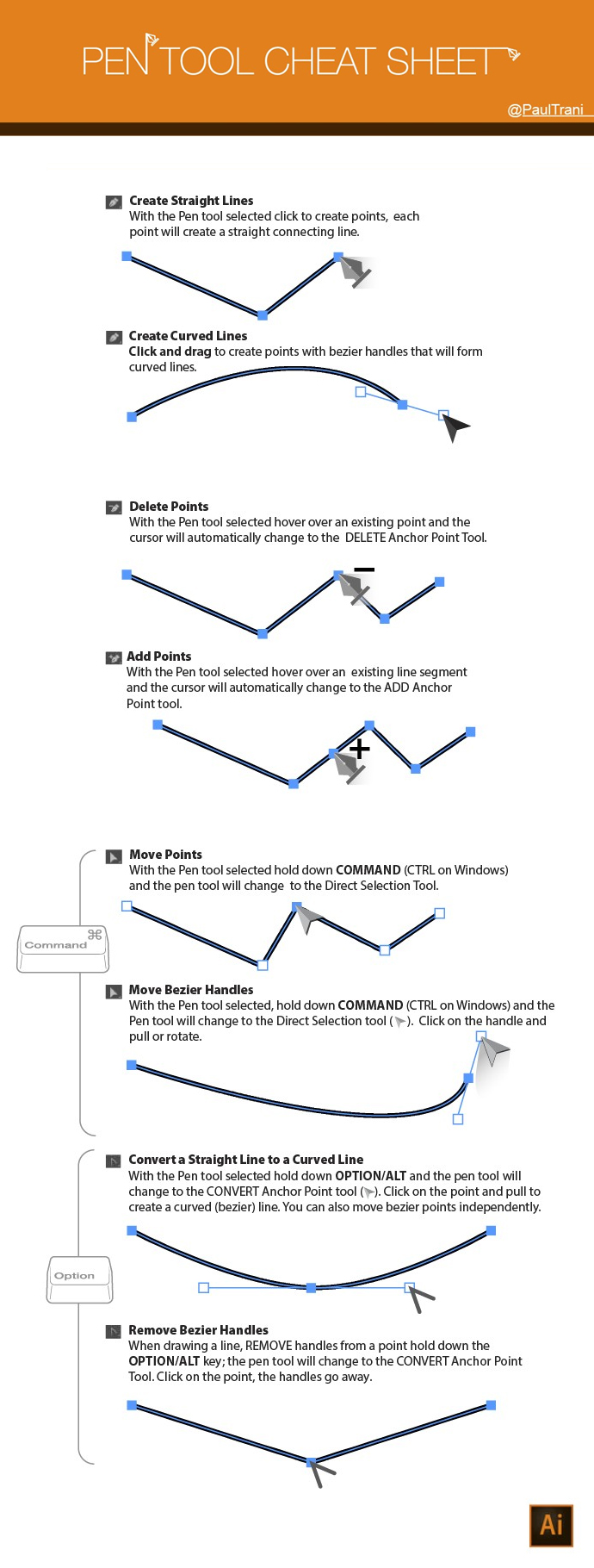
Pen Tool Cheat Sheet

Paul Trani, Senior Worldwide Creative Cloud Evangelist for Adobe, has created a handy ‘Pen Tool’ cheat sheet for Illustrator that shows you how to create straight and curved lines, add/delete/move anchor points and use bezier handles. Check it out below.

Adobe Illustrator 'Pen Tool' Tips For Designers

Share this post with a designer friend and voice your views in the comments below.
Don't Miss:

  • photoshop-curvature-pen-tool
    Photoshop's New Pen Tool Will Make It Easier For You To Draw Curves
  • adobe-illustrator-pen-tool-tips
    Adobe Illustrator ‘Pen Tool’ Cheat Sheet For Designers
  • adobe-good-bones-vector-graphics-editing
    Adobe 'Good Bones' Lets You Change Vector Shapes Easily By Adding A Skeleton Structure
  • how-to-convert-low-res-graphic-to-high-res-in-photoshop
    This Clever Photoshop Trick Lets You Convert Low-Res Graphics To High-Res
  • how-to-create-a-logotype
    Designer Who Created The Instagram Logo Shows You How To Design A Logotype
  • how-to-wrap-text-around-image-in-photoshop
    Learn In One Minute How To Wrap Text Around Any Image In Photoshop

Share Your Views:

Comments for this post are now closed.
Share your thoughts with 433,000+ design lovers on our Facebook Page.

Popular

  • Graphic Designer Fixes The 9 Worst Logos Ever
  • 50 Incredibly Creative Logos With Hidden Meanings
  • 11 Best And Worst Redesigns Of Famous Logos
  • Top 10 Netflix Documentaries For Graphic Designers
  • 11 Differences Between Designers And Clients

TRENDING

  • Top 20 Graphic Design Trends For 2026
  • Top 10 Logo Design Trends For 2026 And How To Use Them
  • Portfolios Of Designers Who Have Worked At Apple, Google, Meta, And More
  • Designers Are Sharing Their Redesigns Of Famous Logos And Some Of Them Are Better Than The Original
  • “Which Current Graphic Design Trend Will Age Badly?” – Here Are The Top Replies

Follow Us On

  • Facebook
  • Facebook Group
  • LinkedIn
  • LinkedIn Group
  • Threads
  • Instagram
  • Pinterest
  • X / Twitter

Copyright © 2012-2026 Digital Synopsis | Privacy Policy | Affiliate Disclosure | Advertise With Us