Lunacy Is A Free, Powerful Graphic Design Software With A Host Of Features And An Intuitive Interface
Ever flipped through a magazine or browsed a website and wondered how those dazzling graphics were created? Behind every compelling design, there’s powerful software at play. For those hunting for a free design app for Mac, Windows and Linux, really, there’s a new champ in town – Lunacy.
What is Lunacy?
Lunacy emerged not just as another name in the vast realm of free graphic design software but as a revolutionizing force. Debuting as a compelling design program, it immediately caught the attention of designers, both novice and professionals. Its swift ascent in popularity wasn’t just because it was free, but largely due to its groundbreaking features, intuitive interface, and versatility.
The true essence of Lunacy lies in its democratization of design. By offering a free design tool that encapsulates features usually reserved for high-end, expensive software, it has leveled the playing field. Designers no longer have to make hefty investments to access top-tier design tools. Lunacy, with its commitment to accessibility without compromising quality, has ensured that everyone from a student with a budding interest in design to a seasoned professional working on intricate projects has the necessary tools at their fingertips.
Lunacy’s Unique Features
The beauty of Lunacy lies in its features. This isn’t just a simple design tool; it’s an ecosystem for designers.
The Intuitive Interface
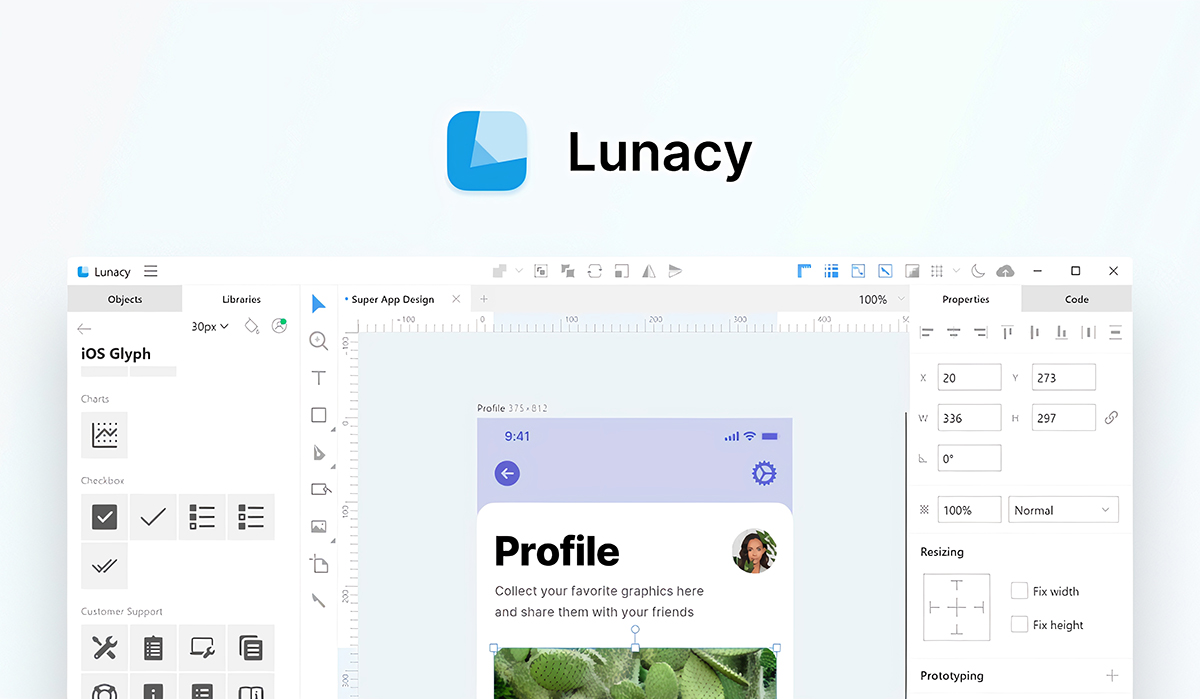
The moment you boot up Lunacy, it feels like you’re using an app to make mood boards. Organized, simple, yet packed with power. Its interface caters not only to professionals but also to newbies looking to design on Mac, Windows or Linux.
Drag & Drop Mechanism
Remember when you’d play with building blocks? The joy of creating something from scratch? Lunacy’s drag and drop mechanism mirrors that feeling, streamlining the designer setup process significantly.
Vector Graphic Abilities
Unlike some free design apps, Lunacy boasts impeccable vector graphic capabilities. It means that your designs can be scaled without a pixel out of place, rivaling any online illustrator alternative.
Real-Time Collaboration
Two heads are better than one, right? Lunacy understands this, introducing real-time collaboration… for free! Whether you’re miles apart or just across the room, team up to make designs that resonate.
Benefits of Using Lunacy
There’s a sea of free design programs out there, but Lunacy is the beacon that stands tall amidst the waves.
Seamless Integration
Integration is a game-changer. Lunacy isn’t just a lone wolf; it plays well with others. Whether you’re incorporating ui textures or using figma constraints, Lunacy makes it hassle-free.
Extensive Asset Library
Lunacy’s asset library stands unparalleled. Be it for a free logo creator, no watermark requirement or any other design need, Lunacy offers an ocean of assets for you to dive into.
Speed & Efficiency
In a race against time, Lunacy emerges as the Usain Bolt of ux design software. Time-consuming tasks are simplified, turning hours into minutes.
Comparing Lunacy with Others
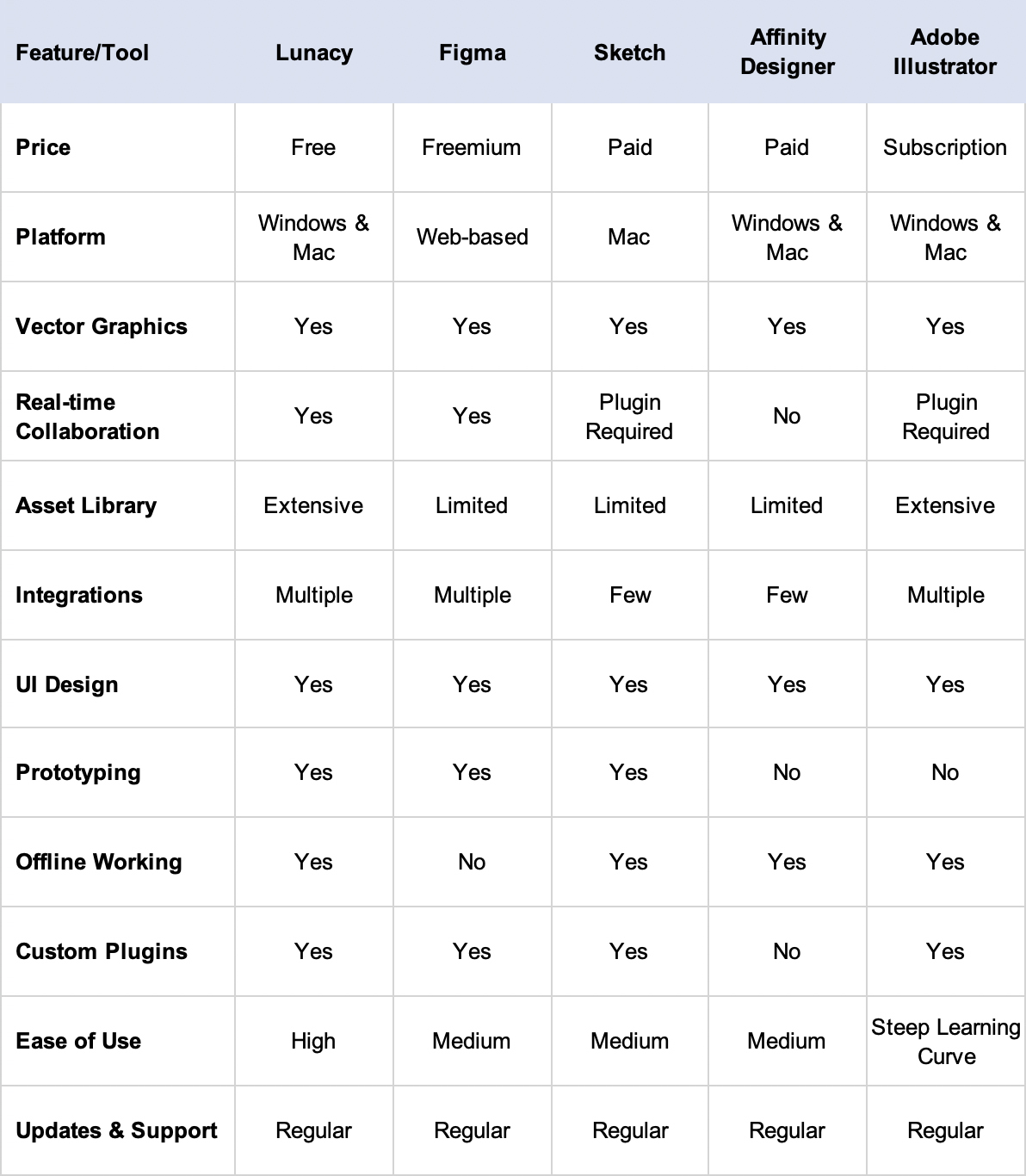
When stacked against competitors, be it a Figma competitor or any other tool, how does Lunacy measure up?
Features Comparison
Lunacy isn’t just another brick in the wall. With a bouquet of features, it stands as an elite tool, offering what most free apps dream of.
Who Should Use Lunacy?
Lunacy, with its vast array of features, beckons a diverse crowd. Let’s delve into the myriad of users who can benefit from this powerhouse of a tool.
Professionals
Seasoned designers know the value of a robust tool that can handle complex tasks with ease. Lunacy rises to the occasion, ensuring that the demands of professionals are not just met, but exceeded. Whether it’s the precision required in vector designs, the intricacies of UI/UX layouts, or the nuances of brand guidelines, Lunacy is the trusted companion that makes even the most intricate tasks feel like a breeze.
Beginners
Stepping into the vast universe of graphic design can be overwhelming. With a multitude of software choices and jargons thrown around, the learning curve can be daunting. This is where Lunacy shines. Its user-friendly interface and intuitive design principles make it less of a tool and more of a mentor. With a vast library of assets, tutorials, and community support, beginners find themselves not just using a tool but immersing themselves in a learning ecosystem, making their initiation into the world of design smooth and enjoyable.
Freelancers
In the freelance arena, versatility is key. Designers are often expected to jump from one project type to another with little warning. Be it designing a chic business card, an interactive website layout, or even a comprehensive brand manual, a freelancer’s toolkit needs to be diverse. Lunacy, with its comprehensive suite of features, ensures that freelancers are equipped for any design challenge thrown their way. Additionally, its zero-cost makes it a boon for freelancers who are often on a budget but don’t want to compromise on quality.
Educators and Students
The educational realm can’t be overlooked. Teachers aiming to impart design knowledge find Lunacy to be an excellent teaching tool. Its ease of use makes demonstrations straightforward, and its collaborative features enable interactive classroom sessions. Students, on the other hand, benefit from a free design app for Mac and Windows, which means no hefty software fees, allowing them to experiment, practice, and hone their skills without financial constraints.
Start-ups and Small Businesses
In the initial phases of a business, budgeting is tight, and every penny counts. However, branding and design can’t be compromised. Lunacy provides an answer to this dilemma. Small businesses and start-ups can take advantage of this free yet powerful tool to create professional-grade designs without incurring the expenses of premium software.
Practical Tips for Using Lunacy
Lunacy, though user-friendly, comes with its bag of tricks. Let’s unveil some.
Keyboard Shortcuts
Every tool has its secrets. With Lunacy, these secrets (or shortcuts) are designed to turbocharge your workflow.
Color Management
Lunacy’s color palette is a treasure trove. Whether you’re looking for subtle hues or vibrant shades, Lunacy has got you covered.
Additional Highlights of Lunacy
Lunacy, with its dynamic capabilities, goes beyond being just another design tool. It’s a platform that continues to grow, adapt, and surprise, offering designers a plethora of features that are often ahead of the curve.
Online Illustrator Alternative
Navigating the vast world of design tools can be daunting, especially when seeking an alternative that doesn’t break the bank. Not only does it replicate many features of renowned design tools, but in some cases, it even surpasses them. Whether you’re looking to create intricate vector designs or simple graphics, Lunacy provides a seamless experience, making it an excellent alternative to some of the industry’s heavyweights.
Free Logo Creator, No Watermark
In the realm of branding, authenticity is key. And nothing speaks authenticity like a unique logo, untarnished by watermarks. Lunacy recognizes this need and delivers with its free logo creator feature. This ensures businesses, be it fledgling start-ups or established giants, can craft logos that resonate with their brand’s ethos, without the distraction of unsightly watermarks. It’s all about making a pristine first impression.
UX Design Tool
But let’s not forget what lies at the heart of Lunacy – its prowess as a UX design tool. The design landscape has witnessed a significant shift towards user experience, and tools need to keep pace. Lunacy does more than just keep pace. With its array of features, designers can effortlessly transition from ideation to wireframing, and from mockups to interactive prototypes. Every step is backed by Lunacy’s commitment to excellence, ensuring designs are not just visually stunning, but user-centric as well.
Designer Setup and Integration
Lunacy’s commitment to the user experience goes beyond its core features. The software provides a smooth designer setup process, allowing new users to get started quickly without any hitches. Moreover, with its compatibility with various other design tools and platforms, integrating Lunacy into your current design workflow is a cinch. Whether you’re working solo or collaborating with a team, Lunacy’s adaptability ensures it fits into any design ecosystem seamlessly.
Conclusion
Lunacy isn’t just another graphic design software; it’s a paradigm shift. By blending simplicity with power, it offers a design experience like no other. Be it a beginner, a professional, or a freelancer; Lunacy has a bit of magic for everyone.