Creative Ways To Use AI Voice Editing Tools For Engaging Content
Voice editing tools powered by AI have unlocked endless possibilities for creators across different industries. Whether it’s enhancing storytelling, creating dynamic characters, or simplifying narration, these tools allow you to modify, refine, and personalize audio effortlessly. Tools like a voice changer offer pitch modulation, audio effects, and more, enabling you to bring creative ideas to life. Combined with features like text-to-speech, these tools provide versatile solutions for content creators, educators, marketers, and entertainers.
In this post, we’ll explore practical use cases for voice editing tools, along with a three-step guide to get started with a voice changer.
1. Elevating storytelling with unique narration
For content creators focused on storytelling, voice editing tools provide an opportunity to enhance narration with unique effects. Whether it’s a podcast episode, a YouTube video, or an audiobook, adding a distinct tone to your narration can captivate your audience.
Practical use:
Dramatic podcasts: Use deep, resonant voices for suspenseful moments or create lighter tones for comedic segments.
Fantasy audiobooks: Add whimsical or mythical effects to bring characters and settings to life.
Educational narratives: Use clear, professional tones for explaining complex topics.
Voice changers ensure that your storytelling remains engaging and immersive.
2. Creating characters for animation and gaming
One of the most creative uses of voice changers is for character creation in animation or gaming. By altering pitch, tone, and effects, you can create distinct voices for multiple characters without hiring voice actors.
Practical use:
Game characters: Develop unique voices for villains, heroes, or NPCs with robotic, deep, or high-pitched tones.
Animated shorts: Add fun and quirky voices to match the personalities of animated characters.
Livestreams: Entertain audiences with on-the-fly character voices during gameplay or commentary.
Combining these effects with a text to speech free generator allows creators to generate and adapt voices quickly for consistent content.
3. Simplifying marketing voiceovers
Marketers often require professional voiceovers for ads, explainer videos, and promotional campaigns. Voice changers provide cost-effective solutions for creating compelling voiceovers in-house.
Practical use:
Social media ads: Create engaging voiceovers that grab attention in the first few seconds.
Product tutorials: Use clear, informative tones for step-by-step guides.
Brand personalization: Modify voices to match your brand’s identity, from cheerful and friendly to sleek and professional.
Voice editing tools streamline the production of high-quality audio for a polished marketing campaign.
4. Enhancing educational content
Educators and trainers can use voice changers to keep learners engaged by adding variation to their presentations. From fun effects for children’s content to professional tones for corporate training, the possibilities are endless.
Practical use:
Children’s lessons: Add playful voice effects to captivate young learners.
Corporate training: Use formal, authoritative tones for instructional content.
Language learning: Alter pitch and tone to simulate different accents or dialects.
Text-to-speech tools make it easy to generate narrations for slideshows, tutorials, and e-learning modules.
5. Personalizing content for social media
Voice changers are a great way to add a unique flair to social media content, making your videos more engaging and shareable. Whether it’s for TikTok, Instagram Reels, or YouTube Shorts, the right voice effect can set your content apart.
Practical use:
Funny skits: Use comedic voice effects for relatable, shareable content.
Trending challenges: Add unique voices to amplify your participation in viral trends.
Behind-the-scenes: Narrate your creative process with a light, conversational tone.
These tools allow creators to maintain a fresh and dynamic voice for social media audiences. Pairing voice effects with CapCut Online’s AI caption generator ensures accessibility and enhances viewer engagement.
A three-step guide to using a CapCut Online voice changer
CapCut Online voice changer is a powerful and user-friendly tool that empowers creators to modify their audio with just a few clicks. Whether you want to add a dramatic flair, make your narration sound robotic, or create playful effects, CapCut makes it easy to explore endless possibilities. The online platform is accessible from any browser, and its intuitive design ensures that even beginners can create professional-quality audio in no time. Perfect for enhancing social media content, gaming videos, or tutorials, the CapCut Online voice changer streamlines the process of crafting unique and engaging audio.
If you’re new to voice editing, using the CapCut Online voice changer is simple and intuitive. Here’s a step-by-step guide to help you get started:
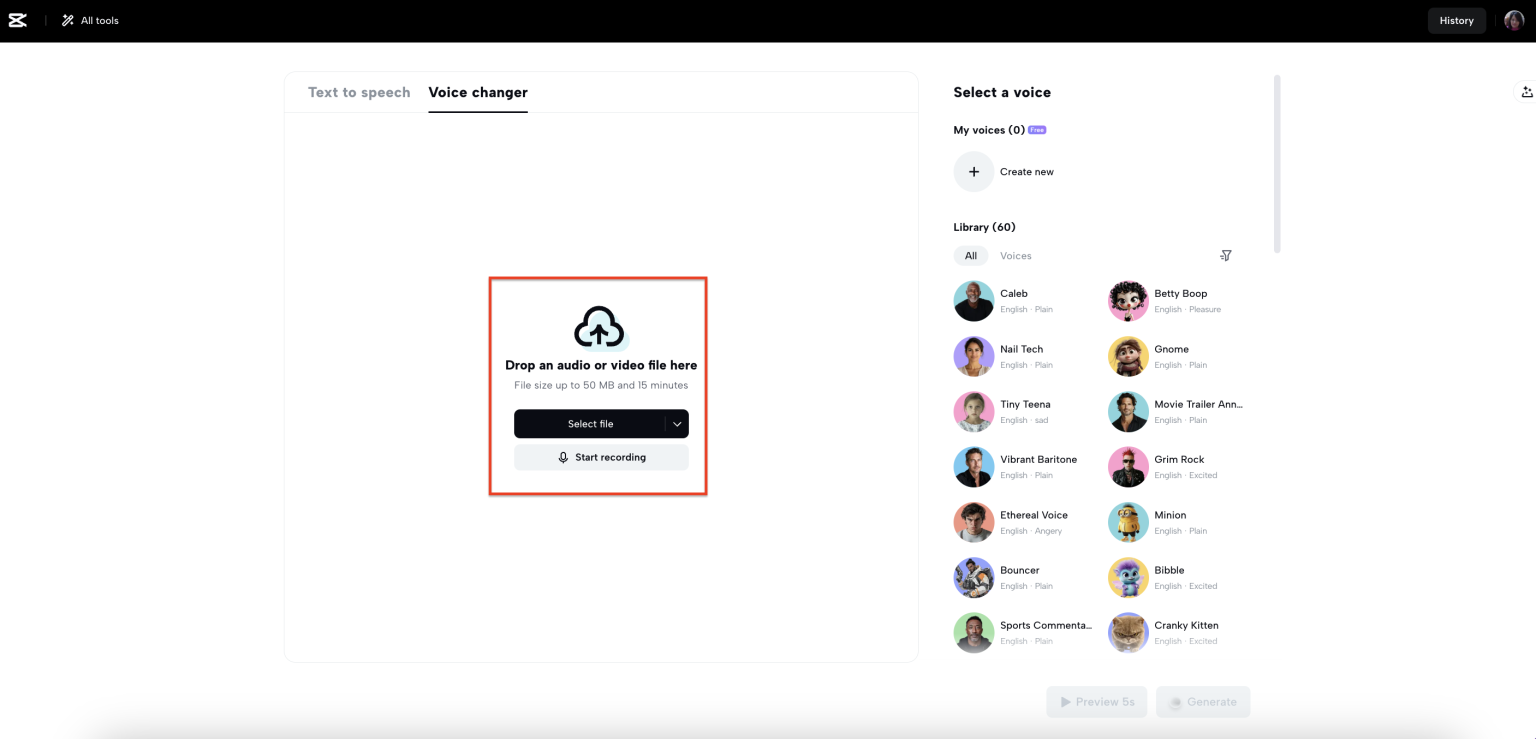
Step 1: Upload or record audio
Begin by uploading an existing audio file or recording directly into the voice changer tool. Ensure the audio is clear and free from background noise to achieve the best results. CapCut Online voice changer supports multiple file formats for easy compatibility.
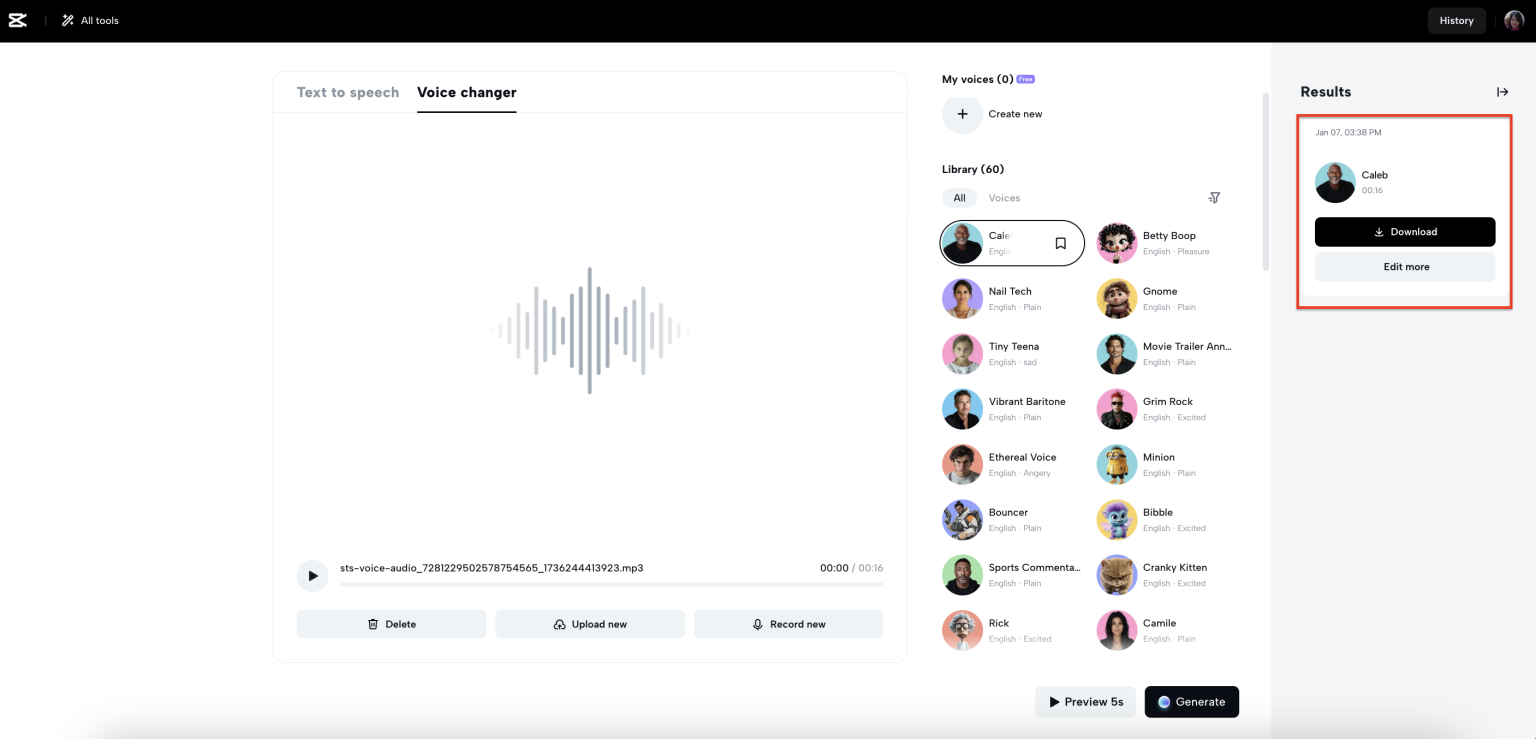
Step 2: Select and apply a voice effect
Browse through the library of voice effects available in the tool. Choose one that aligns with your content—be it a robotic tone for sci-fi content, a deep voice for narration, or a quirky high-pitched effect for humor. Adjust the effect settings to fine-tune the speed & pitch as needed.
Step 3: Download your voice
Once you’re satisfied with the modified voice, save the changes and export the audio file with or without captions. Integrate the edited audio into your video or use it as standalone content for your project.
This straightforward workflow ensures that your audio is perfectly tailored to your creative vision.
6. Creating audio for entertainment
Voice changers offer endless possibilities for entertainers, from musicians to comedians. They help bring unique, memorable elements to performances and projects.
Practical use:
Comedy videos: Add exaggerated voices for humorous skits or parodies.
Music tracks: Experiment with robotic or distorted vocals for electronic or experimental music.
Podcasts: Use distinct voices to create variety or add fictional characters.
The versatility of voice changers makes them an indispensable tool for entertainment.
Final thoughts
AI-powered voice editing tools are transforming the way creators produce and refine audio content. Whether you’re narrating a story, adding character voices, or simplifying marketing voiceovers, tools like a voice changer and text-to-speech free empower you to deliver professional and engaging content effortlessly.
By exploring these practical use cases and following the simple three-step guide, you can unlock the full potential of voice editing tools and bring your creative ideas to life. Start experimenting today and watch how these innovations elevate your storytelling and audience engagement.