Why Google’s Geometrically Flawed Logo Works Better Than A Perfect One
Some logos are built to be noticed. Others are built to be trusted. To show up everywhere, on everything, and never once make you think about them. The Google logo belongs to the second kind.
It appears on browser tabs, app icons, phone screens, loading screens, and the front door of the most visited website on earth. The brain clocks it in under a second and moves on.
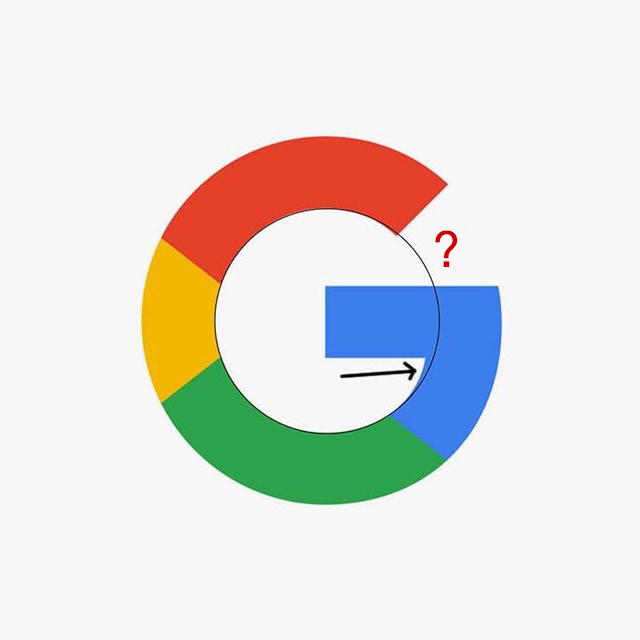
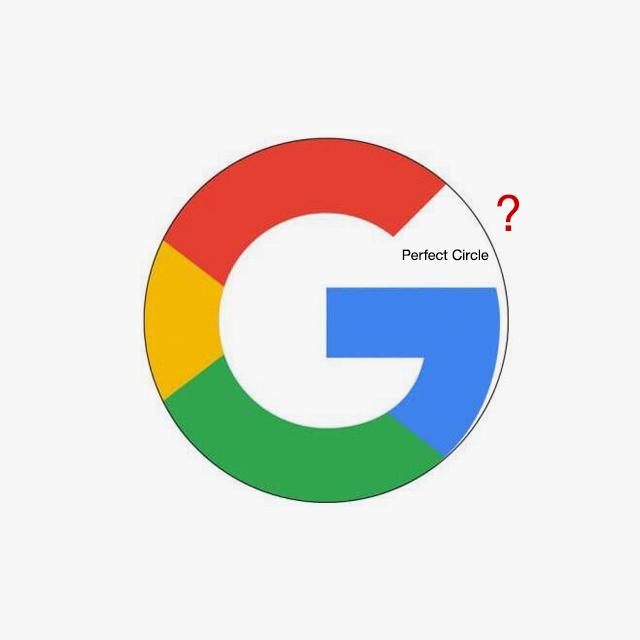
But look closer, and things get strange. Pull the logo into a design program, place a circle over the G, and check how the color segments line up. The shape isn’t a true circle. The color divisions don’t align the way you might expect. The yellow section is also smaller than the others.
By strict geometric standards, several parts of the logo are technically irregular.
And yet it works. The mark remains highly legible, scalable, and visually balanced. Since Google moved away from its old serif logo, this sans-serif G has become the face of one of the world’s best-known brands.
So how does a design that resists perfect geometry end up looking so right?
1. The G Is Not A Perfect Circle, And That’s Not An Accident
Pull the Google G into any design program, drop a circle inside it, and something immediately feels off. The G doesn’t follow the circle. The outer edge drifts. The form bulges where a perfect circle would stay contained. For a company that runs on precision, this looks like it shouldn’t be possible.
But this isn’t a mistake that slipped through a design review at one of the most scrutinized companies on earth. This was a deliberate call. The G is a letterform, not a geometric shape. And the moment you treat it like one, it stops working.
Curved Letters Have Never Followed Perfect Geometry
Here is something every type designer knows and almost nobody else does: a curved letter drawn to the exact same size as a flat letter looks smaller. Always. Without exception.
The eye reads curved edges as retreating inward. So type designers have always made curved letters slightly larger than flat ones, pushing them beyond the guidelines, so both read as the same size. This is called overshooting, and it has been standard practice in type design for centuries. The Google G does the same thing. The form extends beyond where a perfect circle would place it because if it didn’t, it would look wrong to every human eye that sees it.
2. The Color Segments Don’t Line Up, And They’re Not Supposed To
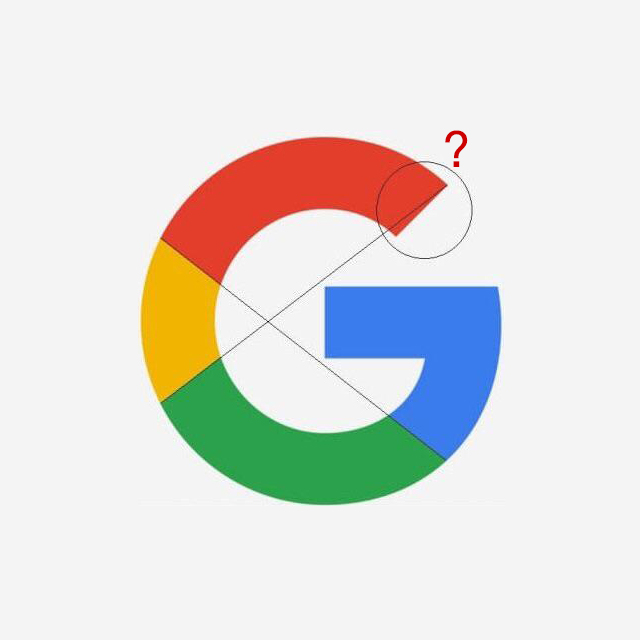
Draw a straight line from where the yellow segment ends on the left side of the G to where the blue segment ends on the right. They don’t meet. The boundaries are offset. By any geometric standard, the color divisions should align, and they don’t.
This is optical balancing applied to color. Each segment has been sized and positioned so the logo feels visually stable, not so it measures correctly. Equal and balanced are not the same thing, and the Google design team knew exactly which one mattered.
The Yellow Arc Is Smaller On Purpose
Of all the details in the Google G that don’t survive measurement, this one surprises people most. The yellow arc is physically smaller than the other color segments. Set a protractor to it and the difference is clear.
The reason has nothing to do with geometry. Yellow is a high-luminance color. It advances toward the eye and carries more perceived weight than red, blue, or green at the same saturation. Make the yellow arc the same size as the others and it immediately dominates. The careful balance across all four colors collapses.
Making it smaller is how the design compensates. The four arcs read as balanced not because they are equal, but because they have been tuned to feel equal. Good design at this level doesn’t announce itself. It just feels right.
Design Is An Argument With Geometry, And Geometry Loses
Grids and guidelines are useful tools. They help designers make consistent decisions and avoid obvious errors. The problem comes when the grid stops being a starting point and becomes the final word.
The grid doesn’t see what the eye sees. It doesn’t account for curves that recede, or bright colors that carry more weight than darker ones, or the fact that equal and balanced are rarely the same thing. The grid measures. It does not perceive.
Every decision in the Google G that fails a geometric test passes the only test that actually counts — does it look right? Does it feel balanced? Does it land immediately without a second thought? The answer, every time, is yes. The Google G isn’t a flawed circle with misaligned color segments. It is a masterclass in knowing when to trust the eye over the ruler.
Watch Designer Will Patterson’s Breakdown Below
UK-based designer Will Patterson breaks down the Google G in full, covering the geometric irregularities, overshooting, optical balancing, and why the mathematically “correct” version of the logo looks worse than the one Google actually uses.
Jump to: 00:00 – Intro 02:11 – Optical Balance 03:07 – Overshooting 04:37 – Optical Balancing 06:12 – Creating the perfect logo
Once you’ve seen it, you can’t unsee it. The imperfect circle, the offset color segments, the smaller yellow arc. None of it was accidental. Someone made those calls, and the logo has been working flawlessly ever since.
Share this article with a designer friend and voice your views in the comments below.