How To Create Amazing Characters With AI Character Generator: 2026 Full Guide
Modern visuals are more than just characters, digital avatars, and educational visuals; they have become vital for the use of digital mascots and characters. Social media characters are becoming more common, leading to the necessity for content creators to develop strategies that are smarter and more efficient when designing these digital mascots. This is why AI Character Generators are helpful.
With AI, digital mascot creators don’t have to know how to draw. Digital mascots don’t have to be professionally illustrated to be effective. Creators can use Dzine AI to create digital mascots and characters at a low cost. European-made AI Dzine is effective, scalable, and fast. Character design made easy with the use of text, images, and guided instructions.
In this guide, we will look at AI Character Design, the use of character generators, and how to creatively and effectively use the Dzine Text to Animation tool to design characters in 2026.
Why Will AI Character Design Be Important?
Visual content in 2026 will be more dynamic, personalized, and responsive. Characters will evolve. No longer will they be static images. They will feature in videos, animations, and even AI-driven conversations.
AI character design will be important in 2026 for the following reasons:
Character creation will take less time and money
More rapid iterations and testing will be possible
Consistent character identities will be possible across different platforms
Character design will be possible for people who do not have design skills
Using AI character generators isn’t just a way to be creative; it’s also a great way to be more productive and stay in line with modern workflows.
How to Choose an AI Character Generator?
Currently, there are many tools available that claim to be AI character generators. The truth, however, is that not all of these tools are suitable for working on real projects.
With the help of a wide range of image generators, attractive characters may be created. However, these generators may struggle to be consistent in their output. If a character is created and then is needed again, the character may look different the second time it is generated. As a result, it can be difficult to maintain the same character through several projects.
An effective AI character generator should allow for:
Consistent visuals throughout character generations
Customization of facial features and the overall aesthetic
Ability to save, modify, and use characters
Industry-compliant visual output
Rather than focusing on just one image, creating a character in Dzine AI makes it a priority to build characters that can be used repeatedly, across different content, campaigns, and platforms.
How to Create Characters with Dzine AI Character Generator?
Depending on your level of control and stage in the creative process, Dzine AI has different character design options.
Method 1. Text to Character Design
Dzine AI has the fastest character design process, using a text-based design. Users can outline a character, and the AI system will design the character based on the user’s description.
In Dzine AI’s character generator, you can set the following:
Gender, age, and other physical features
Art style (choose between realistic, anime, illustrated, and others)
Character mood and personality
Outfit and scene
This is great for brainstorming art concepts and for design in early development phases.
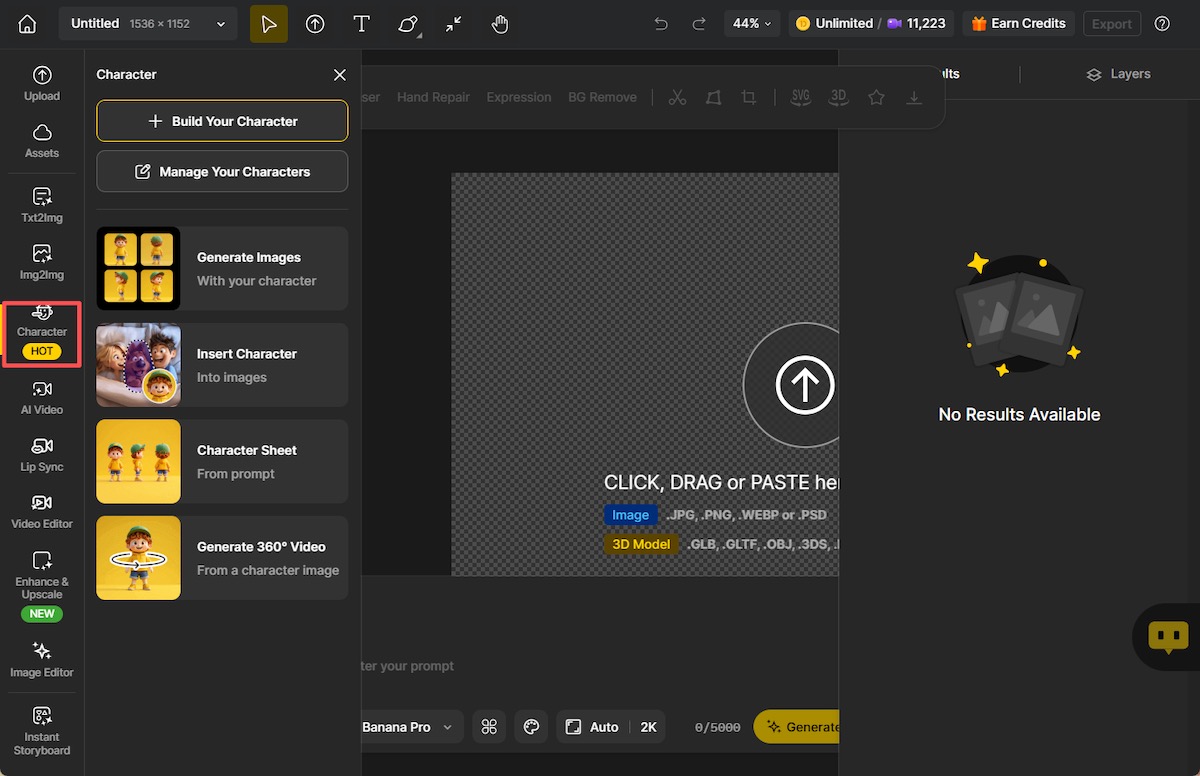
Step 1: Access the character design tool
Sign up to Dzine AI and navigate to the Character Design section. This is where all text-to-character generation tools are centralized, allowing you to start creating characters from scratch using simple text input.
Step 2: Describe your character in detail
Enter a detailed description of your character in the text box. Include key attributes such as appearance, clothing, personality traits, age, and any specific visual elements to help the AI generate a more accurate and expressive character.
Step 3: Choose a style and visual tone
Select your preferred art style and overall visual tone. Whether you’re aiming for cartoon, anime, realistic, or stylized characters, adjusting the style ensures the final result matches your creative intent.
Step 4: Review generated character variations
Dzine AI will generate multiple character design variations based on your description in minutes. Browse through the results to compare different interpretations and identify the version that best fits your vision.
Step 5: Refine and regenerate if needed
If the initial results aren’t exactly what you want, refine your text description or adjust style settings. Regenerate the character to explore improved versions until you achieve the desired look.
Method 2. Build Your Own Character
For more advanced features, Dzine AI allows users to create custom characters. This method is good for large projects where the character’s features and personality need to remain the same throughout the story. This feature can keep you a consistent character during story creation.
As we look ahead, the next logical steps would include continuing to streamline the character creation process, allowing ‘on the fly’ tweaks to characters to improve the user experience, and encouraging users to create characters based on ‘thematic’ inspiration. This would allow for more personalized creation of brand mascots as well as characters for episodic series or regularly recurring characters.
Follow these steps to create, customize, and reuse your own character with Dzine AI.
Step 1: Customize a base character with prompts
Input your idea and requirement on the Consistent Character panel. The detailed character’s face, hairstyle, and body proportions will give Dzine an ultimate reference.
Step 2: Style outfits and accessories
After generating your characters, you may like to modify clothing, add accessories, and adjust expressions to give your character a distinct and recognizable identity.
Step 3: Save your character for future use
Store your customized character in your library so you can quickly access, reuse, or update it later without starting from scratch.
Step 4: Apply your character across designs
Use your character in various designs such as illustrations, marketing visuals, social media content, or storytelling projects. Dzine guarantees that the character’s appearance will remain completely consistent throughout your creative process.
4 Typical Use Cases for AI Character Generators
Brand Marketing and Design
In today’s world, many companies choose to use animations and characters in place of actual people. This is because animated characters are more easily adjustable, less expensive, and can be adapted to new markets more easily.
Using character design generated by AI makes it easy for marketing personnel to design the character mascots and spokespersons, as well as animated illustrations, without the need to hire an illustrator or even an actor.
Content Creation and Social Media
Content creators use AI avatars to create and enhance the presence of their online personas. AI avatars can be used in social media posts and videos, and even hold conversations. An AI avatar generator makes it easier for creators to produce scale content with the same personality.
Game Design and Storytelling
Writers and game developers use AI character design for story development and concept art. Characters can be designed and tested so developers can refine them before they go to full production. Therefore, it speeds up the creative process and reduces costs.
Education and Training
Characters in educational content are often used, and they are often friendly. Trainers, teachers, and creators of educational courses use Dzine, the AI character design tool, to create avatars that visually explain the ideas. Characters help to make learning more engaging.
Popular Prompts for AI Character Design
In AI Character design, the use of prompts is pivotal, so it’s really not about guessing what you want, but more so about what your instructions entail; hence, your prompts should be clearer than ever in order to achieve a more accurate, aligned, and better reproducing character.
This section is aimed at further explaining the essence of prompts and character designing, as well as other use cases.
The Essence of Prompts in Character Design
Character design in AI has its own set of characteristics, and what makes the set differ from the others is the prompts. The prompts create the character design specifications and can define the character in terms of role, mood, and appearance. Unclear prompts bring about the risks of designing what seems to be arbitrary, whereas extensive prompts will lead the AI to design well-thought-out characters.
Prompts can be of a variety, in terms of length and depth, ambiguity, and clear and concise. Presumably, vague prompts will lead to features such as changing styles or a variety of facial features to appear. Prompts can affect randomness and the breaks on the number of times a creation can be produced.
Both style and character can be self-controlled based on the prompts provided.
Lastly, providing reasonable and extensive prompts will, in the end, give you better control over designing the character.
8+ Useful Prompt Categories for AI Character Design
The examples we provide are custom prompts most often used in the AI character design process.
Styles
Prompts
Realistic character
A realistic male character, in his early 30s, soft, friendly, natural skin tone, soft, friendly baby, studio light, clean background, professional casual, digital illustration, background, soft, friendly baby.
Anime character
An anime character, background is too soft, friendly baby, character is drawn with large eyes and a strong smile, cartoonish character, and coloring is strong, bold, and soft, friendly.
Fantasy or sci-fi character
Fantasy character, warrior with soft, friendly baby, clean background, digital illustration background, in his 30s, skin tone armor, strong, bold, and soft, friendly, with a light background character, soft, friendly, baby, light.
Business and educational character
A character of a female teacher, light baby background, named, soft, a neutral, clean background illustration, educational screens, designed for a stress-exhibiting style, colors.
Gothic character
Gothic vampire, dark attire, moonlit night, eerie atmosphere, anime style.
Mythical character
Mythical creature, dragon-human hybrid, mystical landscape, fantasy elements, anime style.
One Piece style
Pirate captain in One Piece, ship deck, ocean waves, adventurous vibe, anime style.
Japanese Ninja
Ninja, stealthy pose, moonlit night, traditional attire, anime style.
Why is Dzine AI a Good Choice for AI Character Design?
We can say with a high degree of certainty that the only cloud character design solutions that place a high value on efficiency, production-ready retention, and usability, completing an entire character design workflow and character image tool, are Dzine AI.
Dzine Ai is the only tool that offers a unique trifecta of speed, flexibility, and consistency.
Designers characterize designs across multiple projects and design collaboration, which fosters the tactical creation of AI character design.
If your needs include finding a sophisticated AI image generator that produces animation-ready characters and provides visuals that can be reused, you may wish to explore this tool here:
Designers can create characters that can move, speak, and interact, and they are on the horizon as AI evolves… quickly. Dzine AI is leading the charge to support this vision. Dzine AI offers more than tools that only create static images.
Designers using an AI character generator are positioned to leave the competition. They are able to create copious amounts of content with a franchising degree of effort, correct routine, and walking the visual identity tight rope of building a stronger set of ideas.
Final Thoughts
Integrating AI into character design streamlining character design is a must in today’s creative process. It’s a quick and efficient method for creating characters for diverse purposes, including marketing, content creation, education, and storytelling. With an AI Character generator, it is possible to instantly create professional and consistent character designs.
To start scaling your ideas and simplifying your workflow, it’s time to design characters using the Dzine AI character design tool. Bring your ideas to life by experimenting with prompts and character designs.