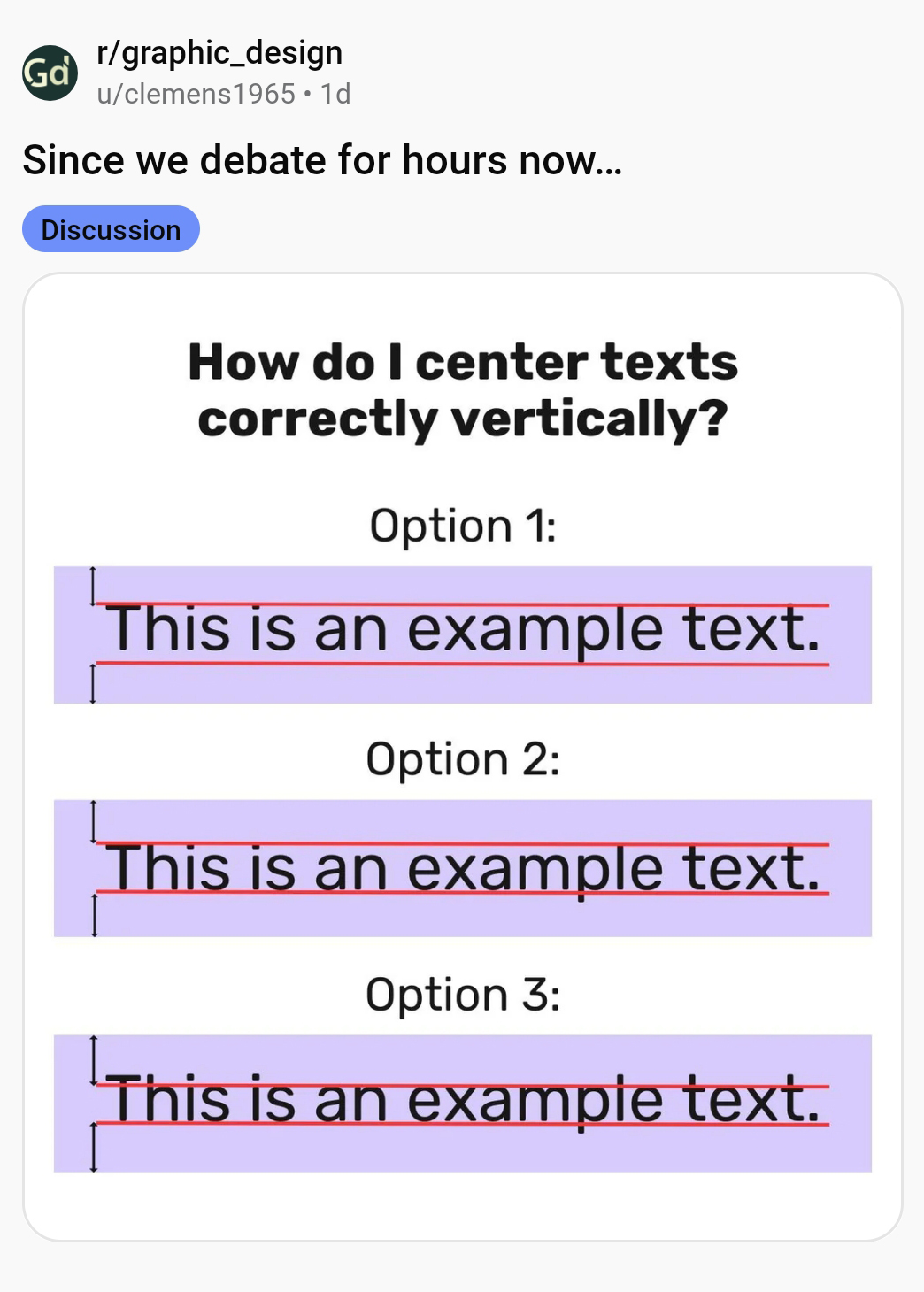
In a recent engaging post on Reddit, a user shared an intriguing image that presented three distinct methods for vertically centering text, using key typographical elements – capital letters, ascenders (the parts of letters that extend above the baseline, such as in “h” or “d”), and descenders (the portions that drop below the baseline, found in letters like “p” or “g”).
The user asked Reddit which method is the correct one, igniting a spirited debate among the community, drawing in designers, typographers, and enthusiasts alike. The conversation delved into the complexities of design aesthetics, readability, and the technicalities of typesetting. Read below.
Replies:
1.
The answer is optically. It’s all relative to what elements you’re centering the text.
– u/graphicdesigncult
❤️ 1.4K
This is the correct and always overlooked answer. I, myself, am guilty of it all the time, I’ll admit. It’s important to follow rules and standards to get to the end of a project. Constraints are the backbone of design, right? But once you’ve finished putting it all together, if you don’t take the time to look at your work and “optically fix it,” then it’s not the best design it can be. Some design requires following rules to a T, like designing heavy machinery, for example. But graphic design is for human eyes. Make it LOOK best.
– u/Icy_Cod4538
❤️ 248
Yep. This is why kerning is hard to teach, tbh. Because eventually the teacher literally has to just go, “You need to do it this way because it’s how it looks best. I have the eye to see it, and you will develop that eye eventually as you work more with glyphs.” And students who have been dealing with teachers who want guaranteed right/wrong answers their entire lives hate ambiguity like that, so it always causes conflict.
– u/Eruionmel
❤️ 87
This, and if you’re looking for a way to be able to see how things balance optically a little easier, turn the design upside-down. Your brain won’t see the text as words to read anymore and will instead see everything as visual shapes. Much easier to balance things optically that way I find.
That trick works really well for kerning as well.
– u/rtyoda
❤️ 44
2.
Yes but…I want a default answer to fallback on when I find myself rotating through settings and squinting my eyes for hours. I need mash potato brain answer.
– u/Killer_Moons
❤️ 18
3.
3, then optical fixes if needed
– u/ZerFunk
❤️ 296
4.
My inclination would be 3, the caps, ascenders and descenders are basically edge cases, visually. For example if this were a workmark for a logo such as “Tekka” I would center the lockup based on the half-way point of the X height as the visual anchor.
Similar to ignoring the ® or ™ hanging off the right side of the mark and trying to center the logo horizontally.
– u/
❤️ 53
5.
I always center on the x-height, so 3. If I was setting all caps, though, it’d be on the cap height.
– u/
❤️ 30
6.
Option 2 for no thinking. Descenders don’t typically throw off the weight significantly.
– u/Pseudoburbia
❤️ 41
7.
Option 4: eyeball it
– u/artpost555
❤️ 351
8.
Option 5. Use the centre of the e
– u/larrysbrain
❤️ 15
9.
21px on the top, 20 on the bottom. Oh fuck oh shit
– u/
❤️ 91
10.
Optically.
This arises often when you have an email or url address in all lowercase on a line by itself in a stack of lines.
– u/pip-whip
❤️ 86
So what’s the correct way to center text vertically?
After all the debate, here’s the simplest way to think about it:
Start with Option 3 (centering around the x-height).
Then adjust it optically.
Because in the end, text isn’t centered by rules, it’s centered by how it looks.
How do you center-align text vertically? Share this post with a designer friend and voice your views in the comments below.