When selecting project management software for macOS, compatibility is more important than feature count. On Mac, a desktop app’s quality, notifications, offline behavior, and compatibility with the rest of macOS frequently determine whether you like using it or just bear it due to the lack of options.
Fortunately, a few apps now treat Mac as a priority rather than an afterthought.
What Mac-Based Creative Teams Need from a PM Tool
- Versioning methods and visual proofing help avoid the headache of the customer reviewing the previous week’s version by allowing you to see exactly what happened between versions.
- Processes for automated reviews that assign tasks to the right individuals at the right times.
- Integrations with native creative tools allow designers to update project status without interrupting their workflow.
- Additionally, because many creative teams operate on boards and timelines rather than task lists, they need flexible, visual workflows.
How We Selected the Tools
In September 2026, Macs accounted for roughly 26.5% of the US desktop market, according to StatCounter. That’s more than one computer in four, so many teams are disappointed by a PM solution that handles macOS as a secondary concern.
This comparison focuses on three key factors: macOS compatibility, mobile app availability, and features relevant to creative teams, including time tracking, client collaboration, and visual project planning.
Best Project Management Tools for Mac-Based Creative Teams
GanttPRO
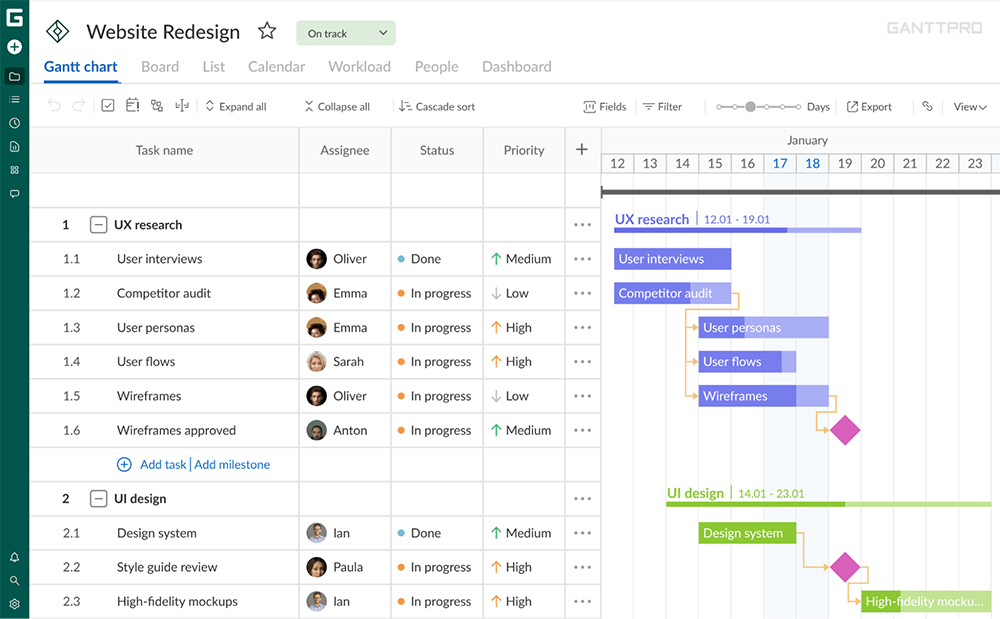
Every project has a clear vision and an overview thanks to GanttPRO. It makes setting up tasks, subtasks, dependencies, and milestones simple.
On Mac: Nothing needs to be installed. Everyone uses the most recent version of GanttPRO, which can be used with Safari or any other Mac browser. Updating tasks, recording time, and responding to comments are all handled using an iPhone app.
Good for creative teams:
- A drag-and-drop Gantt chart with milestones, dependencies, baselines, and the critical path so you can see the effects of a delay.
- Board, dashboard, and list views for users who prefer other ways of visualizing their work.
- Google Calendar and Outlook Calendar connectivity, as well as a shareable private link to display the plan to clients.
The Core plan, which is invoiced annually, starts at $7 per user each month.
Merlin Project
Merlin Project assists in project management, task creation, and effective work distribution. Users of Macs, iPads, and iPhones can utilise the on-premises PM software as it has a cloud version.
On Mac: From the menus to the keyboard shortcuts, this is an authentic Mac application. Dropbox or iCloud are used to share projects between devices and collaborators and additional software manages iPad and iPhone.
Good for creative teams:
- Resource leveling and a view that shows who is overbooked.
- Cost and budget planning, either top-down or bottom-up.
- Microsoft Project files may be imported and exported, which is useful when a client provides an MPP file.
The monthly cost of Merlin Project Express for Mac is $6.99. The full Mac edition costs $22.99 per month, while the iPad and iPhone app costs $9.99.
OmniPlan
OmniPlan can be used for simple as well as complex tasks. It provides an environment where project timetables, resource allocations, and cost estimates all function well together.
On Mac: The Mac, iPhone, iPad, and Apple Vision Pro versions are all covered by the universal license for OmniPlan. It functions and appears like any other well-built Mac application, except there is no browser tab visible.
Good for creative teams:
- An interactive Gantt chart outlines complex task organization and views for network diagrams.
- Resource leveling and automatic scheduling ensure that no one is booked more than once.
- Establishing launch date milestones and emphasizing the critical path.
A one-time Standard license costs $199.99. A $399.99 Pro license or a $199.99 yearly subscription are available for pro features.
Daylite
The primary source for all of your company’s data is Daylite. Because contacts, pipelines, projects, notes, and tasks are all interconnected, you can easily find what you’re looking for.
On Mac: Daylite runs directly on the Mac and provides compatible iPhone and iPad apps. There isn’t a web-based version, and the apps work offline.
Good for creative teams:
- Projects and pipelines with discrete stages are linked to the right client.
- With Apple Calendar’s two-way sync, due dates and meetings are placed where people are already expecting to look.
- Forms for gathering project and client information at the beginning of a project.
The Leap plan covering one user starts at $15 per month and is payable annually. Growth plans are invoiced annually and start at $32 per user per month.
Streamtime
Creative managers can better oversee their team members using Streamtime. This is due to the fact that they can view and modify members’ to-do lists. One of Streamtime’s features is called Deep Data Dive. This is to offer thorough job analysis and reporting, covering everything from hours to costs.
On Mac: Streamtime operates in the browser. Although Safari is also supported, Chrome is the preferred browser. An iPhone app makes it simple to log time between meetings.
Good for creative teams:
- Time tracking and scheduling without the use of traditional timesheets.
- Using Xero and QuickBooks connectivity, quotes and invoices are generated directly from the task plan.
- A “Happiness Coach” who gathers brief mood check-ins from the team and a Kanban board for job stages.
Streamtime doesn’t list set costs. Rather, it provides a personalized monthly or annual plan based on the size of your team, the number of freelancers you employ, and the services you require.
Plutio
Plutio provides you with project management where activities are immediately linked to billing, client information, and time entries. The time recorded for each task you finish automatically updates the project’s progress.
On Mac: Plutio provides a desktop application in addition to browser functionality. When you’re not at your desk, you can monitor work via apps for your iPhone and iPad.
Good for creative teams:
- Time tracking, projects, and file storage all in one workspace.
- Unlimited contracts, invoices, and proposals for each plan.
- Forms and resources for scheduling discovery calls and client intake.
$15.83 per month payable annually, or $19 per month on the Core plan. The Pro option, which has 30 contributors, is $49 a month, while Core is just for one individual.
Bordio
Bordio is an online work management solution created to improve team output and efficiency. Bordio makes it simple for managers to assign tasks to team members and track their progress.
On Mac: Bordio functions as a web application on your Mac browser, and an iPhone app allows you to check the schedule for the day, add tasks, and respond to messages.
Good for creative teams:
- A Kanban board with unique statuses for every project.
- Ideas and tasks are kept on a waiting list until they are ready to be scheduled.
- A task chat, an integrated timer, and guest access for clients and independent contractors.
Team plans begin at $4.99 per user per month.
Quick Comparison Table
| Tool | Mac app | iOS app | Best for | Starting price |
|---|---|---|---|---|
| GanttPRO | Web app, any browser | iPhone | Visual planning and deadlines, long, multi-phase projects | $7/user/month, billed annually |
| Merlin Project | Native | iPhone, iPad | Offline planning in a native Mac app | $6.99/month (Express) |
| OmniPlan | Native | iPhone, iPad | Detailed scheduling | $199.99 one-time |
| Daylite | Native | iPhone, iPad | Clients and projects in one app | $15/month, billed annually |
| Streamtime | Web app, Safari supported | iPhone | Agency budgets and job costing | Custom quote |
| Plutio | Desktop app and web | iPhone, iPad | Freelancers and small studios | $15.83/month, billed annually |
| Bordio | Web app | iPhone | Simple weekly planning | $4.99/user/month |
For teams interested in exploring additional options, GanttPRO also provides a broader comparison of project management software for Mac.
Conclusion
There isn’t one specific optimal project management tool for your creative teams. The best option will depend on how your team actually performs, including how many projects you manage concurrently and whether timeframes, budgets, or basic daily planning are your primary concerns.
Select the tool targeting the specific issue that slows down your team the most. Then, before requesting your team to switch, test it on one actual project. Rather than a big feature list, the fact that a product suits your routine is more important.