Medical device interfaces have a reputation problem. For decades, “healthcare UI” meant grey buttons, beeping alarms, and screens that looked like they hadn’t been updated since Windows 95. A lot of them still look that way.
But something has shifted in the last few years. Hardware companies finally figured out that nurses, doctors, and patients are users too. That UX matters more when someone’s life depends on tapping the right button. And that good design in healthcare isn’t a luxury, it’s a safety feature.
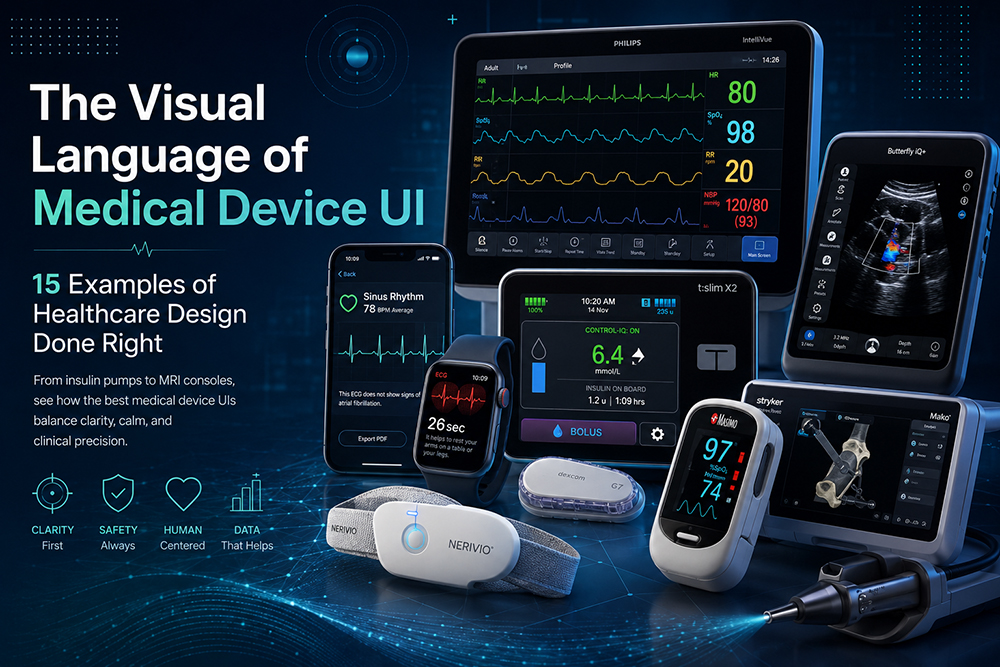
This list isn’t about the prettiest medical screens. It’s about the ones that get the visual language right: clear information hierarchy, restrained colour, typography that survives a bright OR, and interaction patterns that don’t make tired clinicians second-guess themselves at 3 AM.
A quick caveat before the list. Medical UI sits at the intersection of design and serious engineering. Every interface here is the visible tip of months (sometimes years) of medical device development, regulatory work, and clinical testing. That backdrop is worth keeping in mind as you look at each example, because what’s on screen is the result of compromises and constraints designers in other industries rarely face.
1. Tandem t:slim X2 Insulin Pump
The interface looks more like a smartphone than a medical device, and that’s the point. A full-colour touchscreen, swipe gestures borrowed from iOS, and a home screen that shows insulin on board and glucose with about three glances of cognitive effort. Tandem proved that medical devices don’t have to feel like medical devices to be taken seriously.
2. Apple Health on Apple Watch (ECG)
The ECG feature on the Watch is a masterclass in turning intimidating data into something approachable. The waveform animates as it’s being recorded. The result screen uses calm colour coding (green for sinus rhythm, yellow for inconclusive) instead of clinical red alerts. It tells you what it found in plain language, then offers a PDF for your doctor.
3. Theranica Nerivio Migraine Device
A wearable that treats migraines through neuromodulation, controlled from a phone app. The visual language leans warm, soft gradients, gentle illustrations, never the cold blues and greens of traditional medtech. For a device that treats pain, the interface itself feels like part of the therapy.
4. Owlet Smart Sock
For parents monitoring infant heart rate, the design challenge is enormous: surface alarming data without inducing panic. Owlet’s app uses a calm baby-blue palette, large readable type, and gentle ambient indicators. Critical alerts break the pattern with red and motion, exactly when they should.
5. Philips IntelliVue Patient Monitor
The classic hospital bedside monitor, refined over years. Waveforms are colour-coded by physiological system (red for cardiac, blue for respiratory, yellow for blood pressure), numbers are big enough to read from across the room, and the interface adapts based on who’s looking.
6. Eko CORE Digital Stethoscope
A 200-year-old instrument got a screen, and Eko didn’t blow it. The companion app visualises heart sounds as a real-time waveform with AI-assisted annotation. Restrained, monochrome with a single accent colour, lots of whitespace. It treats clinicians like adults.
7. Medtronic MiniMed 780G
Insulin pumps live on people’s bodies 24/7, and Medtronic finally accepted that the interface needs to feel personal. Colour customisation, dark mode, an information hierarchy that puts the next decision at the centre of every screen. It’s still a medical device, but it stopped trying to look like one.
8. Butterfly iQ+ Handheld Ultrasound
Whole-body ultrasound on an iPhone. The interface borrows mobile conventions ruthlessly: pinch to zoom, slide to adjust depth, swipe between presets. For a device that used to require a cart-sized console, the UX makes the technology genuinely portable, physically and cognitively.
9. AliveCor KardiaMobile
A credit-card-sized ECG that pairs with your phone. The screen shows your rhythm in real time as you press your fingers to the pad. What makes the design work is the reduction: one waveform, one number (BPM), one verdict. No clutter, no jargon, no anxiety dashboards.
10. Withings BPM Connect
Most home blood pressure monitors look like beige medical equipment from 1998. Withings designed one that looks like a Bang & Olufsen accessory and reads its results on a curved E Ink display. The companion app uses data visualisation that actually makes you want to track your numbers.
11. Stryker Mako Robotic Surgery Console
Surgical robotics interfaces have historically been dense and pilot-cockpit-busy. Mako balances the necessary complexity (real-time bone modelling, instrument tracking, haptic feedback) with disciplined typography and a strict colour system. Critical information stays visible. Everything else recedes when not needed.
12. GE Voluson Expert Series Ultrasound
Maternal-fetal ultrasounds carry emotional weight beyond clinical data. GE redesigned the Voluson with a darker background, softer colour temperature, and 3D rendering that makes fetal images look almost photographic. Healthcare design isn’t just about clarity, sometimes it’s about emotional context.
13. Insulet Omnipod 5
The wireless insulin pump’s controller looks like a slim smartphone, and the home screen does one thing brilliantly: it always tells you whether the system is running automatically or needs your attention. Status communication through colour, animation, and information density is exactly right.
14. Verily Study Watch
A research-grade wearable from Alphabet’s life sciences arm. The watch face is intentionally minimal, mostly black, with monochromatic data when needed. The visual language signals research-grade seriousness without becoming intimidating.
15. Masimo Rad-G Pulse Oximeter
Pulse oximetry exploded into public consciousness during COVID, and most consumer models still look like dollar-store gadgets. The Masimo Rad-G is built for clinical use but designed with consumer-grade clarity, large numerals, animated waveform, traffic-light colour coding for SpO2 readings.
What These 15 Examples Have in Common
Zoom out across all of them, and the same design principles keep appearing. Restraint over decoration. Colour used as information, not ornament. Typography sized for stressed, tired, or visually impaired users. Animation that signals state changes, not animation for its own sake. And a deep understanding that the user is rarely a “user” in the abstract designer sense, they’re a sleep-deprived nurse, a worried parent, a patient with shaking hands.
The visual language of good medical device UI isn’t really about aesthetics. It’s about reducing the cognitive load of life-or-death decisions. The best examples make complex information feel simple without dumbing it down.
What you see on screen is only the visible layer. Behind every good medical UI is a stack of firmware, embedded software, regulatory work, and clinical validation that designers don’t always see. The unglamorous parts (IEC 62304, ISO 13485, human factors testing) get as much attention as the pixels, because the pixels only matter when everything underneath them works perfectly.
For designers used to the consumer software world, healthcare is humbling. The constraints are tighter, the stakes are higher, and the user research is harder to schedule. But when it’s done right, the work changes lives in a way that designing another SaaS dashboard never quite will. These 15 examples prove the bar has finally been raised. The question is who’ll raise it next.