How AI And Design Create Personalized Reading And Math Experiences For Kids
The visual part of learning has a huge impact — and, in the long run, it matters for both a 1st- and a 12th-grader. AI has driven a revolution in this regard, helping to make the design part, as well as overall learning, more personalized, tailored, and engaging.
For this writing, we will delve deeper into the impacts of AI and design parts, and also reveal how you can use them during lessons.
AI and Design Approaches to Support Kids’ Learning: Case Study
We could discuss the power of AI + design in theory. But instead, let’s take an exact example of the Brighterly reading and math tutoring program online — the service that uses both constituents. But first, what is Brighterly?
It’s a personalized, 1:1-oriented provider of e-learning services that prioritizes gamification and interactivity. In practice, it means that each of their lessons would include a bunch of visually enhanced activities to help with understanding, boost involvement, and improve focus. And, of course, the very essence of this approach relies heavily on the design, as powered mainly by AI.
That said, let’s break it down further, into exact features.
AI-powered lessons that align with the US state requirements
The thing about Brighterly is that it smartly blends the benefits of AI with tutoring. Take note of this: what you see is lessons delivered live by a real tutor with years of experience.
But what’s hidden behind the curtain are innovative AI technologies that help compile comprehensive schedules, improving individual pace while aligning with educational standards across the US. That’s how that balance is achieved: your kid trains what they want, what they need, and what’s required by their schools — yes, the Brighterly math and reading program strikes all three with the integration of Artificial Intelligence.
Personalized learning paths combining math and reading
But a little bit more about personalization… At this reading and math service, each child begins their journey by undergoing an evaluation that estimates their current level and priorities.
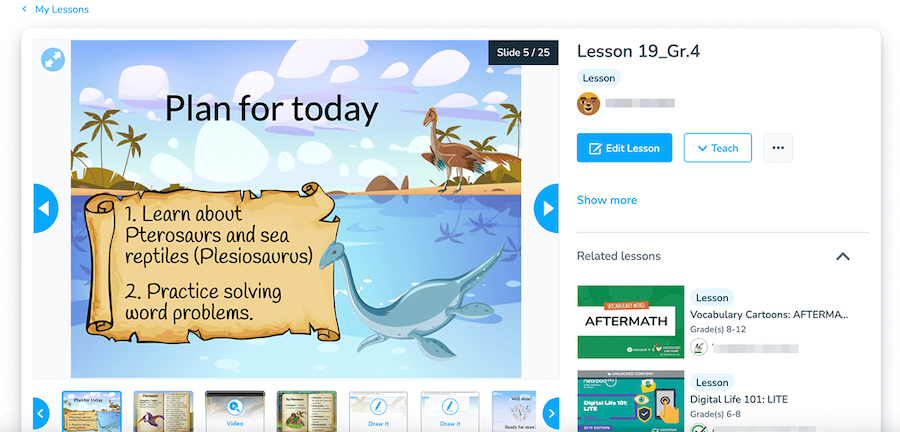
Then, they start learning and closely collaborate with an assigned tutor. The result? Mutual trust and a better notion of personal needs. And it’s where that visual element comes into play as a tutor tries to create tasks and designs that match what a kid likes. So, better interest in topics, stronger associations, and long-term memory retention. For example, this kid seemed to be crazy about the dinosaur theme:
1:1 tutoring for better comprehension
Brighterly brings personalized learning experiences without the fuss in a 1:1 format. After all, tutors wouldn’t be able to create that level of tailored designs in a group setting. But when working one-on-one, they know exactly what a child needs and adjust lessons accordingly — with the help of AI-powered lessons, of course.
Simple Guide on How to Use AI + Design During Your Kid’s Learning
Ok, now that you have an exact case of how AI combined with successful design can boost learning, you might also want to integrate those two for your lessons. Here’s how you can do it.
Turn Lessons into Games
The moment your kid starts perceiving learning as just a game is when success comes. While using diverse design apps, you can turn learning math concepts or reading passages into fun activities, such as puzzles, crosswords, or bingo.
Use AI to Revise a Topic
The minimum experience with ChatGPT is enough to create fun activities for topic revisions. And the good news is that you’re not limited to a single format here, either. Just upload the necessary information or only provide a link to your workbook — after just seconds, you will receive comprehensive checklists or topic-check sheets with test tasks.
Create Diagrams & Visual Maps
Some materials are difficult to comprehend without visual support, and some are impossible to understand without it. So why not use specialized map tools to create a more interactive learning for kids? For example, this way, you can show story characters or better explain math concepts. And if a kid is a visual learner, they will just flourish on this practice.
Use AI to Analyze Learning Success
Both at home and in school, one needs to create a strong study plan. That’s when AI comes in handy, allowing you to analyze the current success of a child, as well as areas for improvement. Then, this information can be used to make up a clear roadmap and decide which topics to study next.
Integrate Voice into Your Lessons
One great thing about AI tools is that they can recognize images and convert them into speech. These creative learning experiences are invaluable for reading comprehension. Moreover, they can free up time for parents and educators alike, letting kids do more self-practice.
Design a Reward System for Motivation
Gamified visuals have always helped kids to stay on track. When they see a specific aim (and are also encouraged by some rewards), they enjoy the process more eagerly. After all, everyone needs a bit of that motivation.
Why Start Integrating AI and Visuals Today?
Of course, adopting new tools takes time and effort. So, you should see clear benefits before you start. When it comes to the design and AI personalized learning, you can achieve the following pros:
Better personalization — a kid gets exactly what and when they need.
Higher engagement — visuals are always more attractive than plain text.
Boosted comprehension — some concepts simply cannot be explained without visuals.
Motivation — your kid has a distinct roadmap with clear goals, so they know which way they are moving in learning.
Balanced studying — with the combination of both tools, you can receive a learning structure along with higher involvement — the ideal mix.
Conclusion
Obviously, the world of education is constantly evolving to meet students’ growing needs and leverage the latest technology and best practices. What’s pleasing is that current changes are definitely for the good — encouraging more conscious, reflective, and student-oriented learning.
And even though some new tech may seem like a tough nut to crack at first, you now know that it’s all worth the effort. So pick your new favorite AI or design tools and start making the learning magic today!