Are you a designer, photographer or other creatives? Then, you’ve definitely thought about how to make a lot of people get to know about what you do. Today, the Internet is one of the most effective ways to share information about you or the services you offer. Creating a portfolio web page you let people see your brand new works, the process of their creation, or check your previous projects.
Using your own website you can improve your brand awareness by spraying the information about your creative venture online. You can do your business better getting the real feedback from your clients through the web page.
But, have you ever thought about how to create a website that would attract as many people as possible? What do you need to build an eye-catching professional portfolio? While different web design studios offer various approaches, we’ve decided to make our own list with tips on how to establish a portfolio with WordPress.
How To Create An Engaging Portfolio With WordPress?
1. Think of the purpose first
Before you start creating a website, you should decide which exact goals you are chasing. Consider which options and features should come with your template. Try to imagine your website appearance when development is over.
2. Choose an appropriate theme
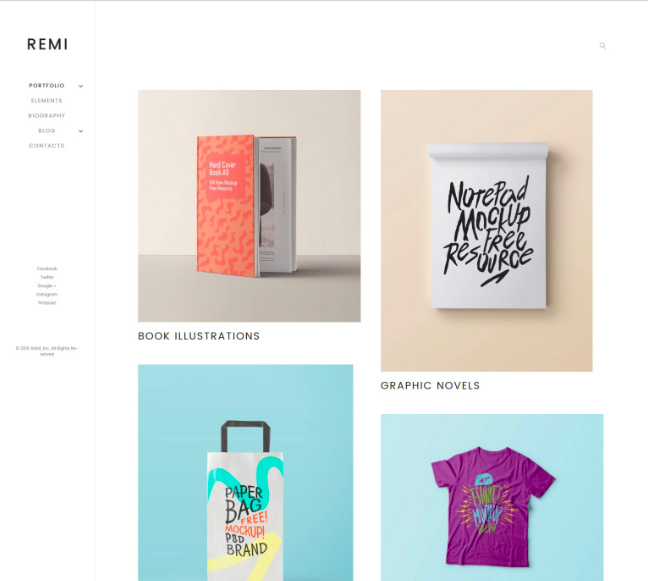
Choosing the correct theme is one of the main steps in creating a portfolio web page. All themes are different in their design, features, and instruments included in the pack. But, let’s take a closer look at least at one of them:
Remi
Remi is one of stylish photographer WordPress portfolio themes that can be the right choice if you want to create an impressive website with rich functionality. It would be easier than you can imagine because 24\7 support team is always ready to help you with any question. Being fully responsive Remi have a perfect look on any mobile device. Built-in Live Customizer allows you to edit pages and check the changes without reloading your page. However, consider that images are not included in this pack, you should choose and buy them separately.
3. Make your portfolio visually appealing
Choose the design that would highlight your works in the best way. Use similar visual elements, choose the right colors. Every item should interact with the rest portfolio content. Make sure to not use images with low resolution and have copyright or permission to post those them.
4. Add your resume
A resume can show your career development and present your skills in a clear and structured way. Everyone interested in working with you will be able to review detailed information about your experience and qualifications. Some professionals choose services like Resumeble to create a polished, well-structured resume.
5. Be selective when choosing things to showcase
Choosing projects is one of the main steps in creating a portfolio. Use only images or projects that you are proud of. Refresh your portfolio every time and leave only projects that show you as a professional. Do not post similar projects, keep your portfolio diverse.
6. Start a blog
With your own blog, you can keep activity on your website and communicate with your readers and customers. You may tell people about your activity area, some interesting nuances from your working process, and many others.
7. Tell your story
Share the story about your background in the blog. People like to see what is going on behind the scene. You can tell where you’ve come from, how you’ve started to do what you do, upload some own pictures. People will trust you more when they know who you are in real life.
8. Update it regularly
Update and refresh your site regularly. It shouldn’t be a huge change. Just add some widget, change a few images, play with colors. People will see that you are working on your website and trying to make it better.
9. Add testimonials
Honest feedback is an important thing in any type of business, even if it is negative. Thanks to testimonials, you can see your weak sides and work to make them better. Besides, potential clients will trust you more when they see real feedback from your previous customers.
10. Link to Your Social Media Profiles
Now, when people are interested in your work, they may be interested in you like in a person. Let them follow you on Twitter, check your pictures on Instagram, and follow you on Facebook. Social media can be an additional way to attract people and make them order your services.
Final word
Carefully built portfolio can boost your business and delivers a lot of new opportunities to interact with your clients. However, you should keep some simple rules to make everything right. One of the most important things is an accurately chosen portfolio theme. So, you can look for one you need right now and become closer to your perfect portfolio webpage with WordPress.
Share this post with a friend and voice your views in the comments below.